
Cat Tiles: Cute Piano Game
WingsMobMusic
4.597.00 Reviews
- Version
- 2.4.3
- Installs
- 10.00M
- Age Rating
- Everyone
Screenshots
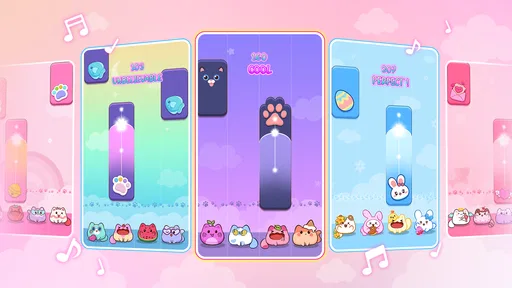

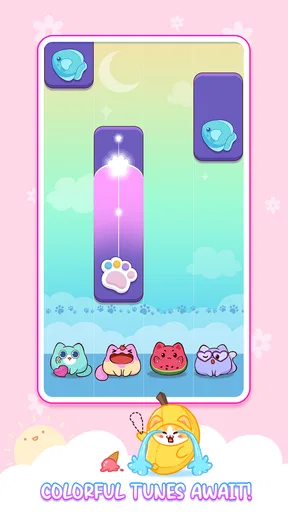
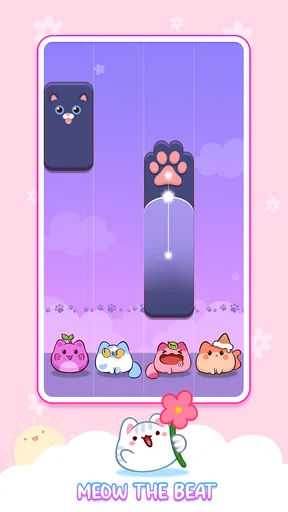
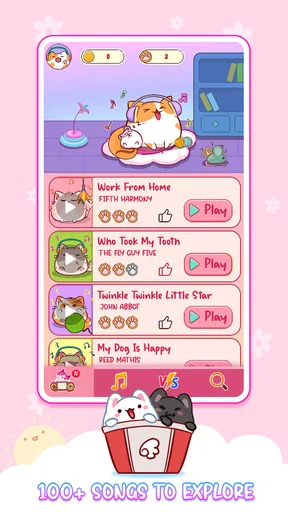

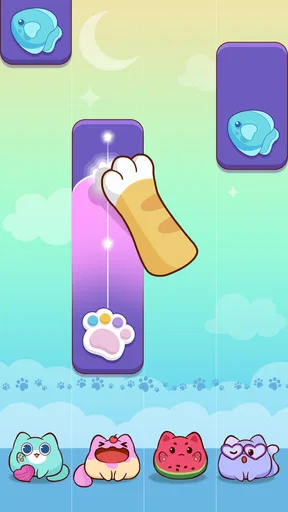
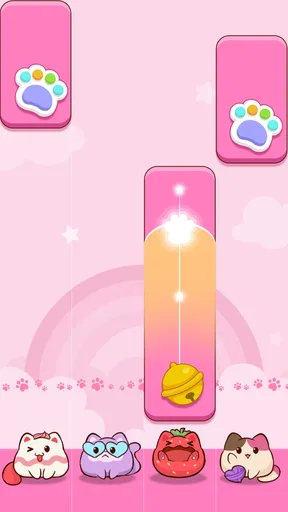
Our Review of Cat Tiles: Cute Piano Game
 Analysis by Appyee
I spent time with Cat Tiles: Cute Piano Game to understand whether its central idea works beyond a quick glance at the store page. This is a free music game from WingsMob built around tapping piano-style tiles, with a cat-themed presentation that gives the familiar rhythm format a lighter, friendlier personality. My first impression was that it is designed for short sessions rather than serious musical training, but that does not make it shallow. The timing challenge can become surprisingly absorbing once I stop treating each round as a casual tap and start listening for the beat.
The most important thing to understand is that the game’s real strength is its direct connection between visual timing and musical rhythm. I am not playing a piano in the traditional sense, and I would not use it to learn scales or proper fingering. Instead, I am reacting to a stream of tiles and trying to keep my taps aligned with the flow. That narrow focus makes the game easy to begin, yet it also creates a clear skill curve: the better I recognize patterns and maintain a steady tempo, the more controlled the experience feels.
Why the tile-and-rhythm idea works
Many mobile music games try to impress with complicated controls, large song libraries, or elaborate progression systems. This one takes a more immediate route. The screen presents the action clearly, and the main task is simple enough to understand without a tutorial-heavy introduction. That simplicity matters when I want something I can open during a short break, play with one hand, and put away without having to remember a complicated setup.
The cat theme also changes the mood. A serious piano interface might make a missed note feel like a performance mistake, while the cute visual style makes failure easier to shrug off and try again. I found that useful when playing casually, especially when I was learning the pace of a particular section. The presentation does not replace good timing, but it lowers the pressure around it.
In practical terms, the game’s capability is not “teaching piano”; it is turning rhythm recognition into a compact touch challenge. That distinction is important. If you want a structured lesson, notation, chord practice, or feedback about musical technique, this is the wrong category of app. If you want a responsive game that makes you pay attention to tempo, it has a much clearer purpose.
The free price makes that purpose easy to test. I can install it without committing money first, and the Everyone content rating makes it suitable for a broad audience. That does not mean every player will enjoy it equally. People who dislike repetition or reflex-based challenges may find the loop too narrow, while players who enjoy improving a personal run can get more from it than the short store summary suggests.
What I noticed during the first sessions
My first useful adjustment was to stop tapping only with my eyes. The tiles tell me where to touch, but the music helps me anticipate when the next action should happen. When I focus entirely on the graphics, I tend to react late as the pace rises. When I use the sound as a timing guide and the tiles as a position guide, my hands feel less frantic. This is a small change, but it is the difference between random tapping and rhythm play.
I also learned that a larger phone screen is not automatically better. A wide display gives my fingers more room, but it can make the distance between taps feel less natural if I hold the device awkwardly. On a smaller phone, the action can feel more concentrated and easier to follow, although accidental touches become more noticeable. I would suggest trying a comfortable grip before deciding that a missed run is caused by difficulty alone.
Another practical point is to play with a consistent posture. When I hold the phone flat and keep one finger ready near the active area, my timing is steadier than when I shift the device between hands. This sounds obvious, yet it matters in a game where a tiny hesitation can break the rhythm. For short sessions, I prefer a relaxed grip and a quiet place where I can hear the audio cues without turning the volume up too far.
How the challenge feels over time
The early appeal comes from accessibility, but the longer-term appeal comes from repetition with purpose. I can replay a section not because the controls change dramatically, but because I understand the pattern a little better each time. That creates a familiar mobile-game tension: the rules are simple, while execution remains demanding.
I would not describe the experience as a deep rhythm simulator. Its value is more focused. It gives me a quick test of attention, hand coordination, and tempo awareness. The best sessions are the ones where I enter a steady rhythm and stop thinking about each individual tile. The weakest sessions are those where the challenge feels like a sequence of emergency reactions rather than a musical flow.
That difference depends partly on the player. Someone already comfortable with rhythm games may reach the comfortable stage quickly and want more variety afterward. A newcomer may appreciate having only one main action to learn. For children or family play, the cute style and straightforward interaction are approachable, but younger players may still need sensible limits because repeated attempts can encourage “just one more try” behavior.
A realistic everyday use case
The strongest scenario for me is a short waiting period: sitting on public transport, waiting for an appointment, or taking a break between tasks. I can play a few rounds without needing a long narrative or a large mental commitment. The game also works as a small reset after concentrated work because it asks me to follow a beat instead of reading, planning, or managing several systems at once.
There is a useful difference between this and simply listening to music. Listening is passive; here I have to maintain attention. At the same time, it is less demanding than a full action game because the rules remain centered on tapping the tiles. That makes it a reasonable choice when I want light engagement rather than a competitive multiplayer match or a lengthy single-player adventure.
I would be more cautious about using it in places where sound is inappropriate. The musical feedback is part of the experience, and playing silently may make timing less intuitive. If I am in a quiet office or a waiting room, I would either use headphones responsibly or choose another activity. The game is easy to start discreetly, but its rhythm focus is less satisfying when I cannot comfortably hear what is happening.
Small techniques that improve the experience
My most useful tip is to begin with accuracy rather than speed. Trying to chase fast taps immediately makes me tense, and tension leads to uneven timing. I get better results by treating the first attempts as a way to learn the song’s pulse. Once the movement feels predictable, speed becomes less intimidating.
A second tip is to use the same tapping finger for a while instead of switching constantly. Alternating fingers may eventually feel natural for some players, but changing technique in the middle of a difficult sequence can create unnecessary hesitation. I prefer to find a comfortable method, repeat it, and only experiment after I understand where I am losing the beat.
A third insight is that short breaks between attempts are worthwhile. Because the core action is repetitive, frustration can build without being obvious. I play better after putting the phone down for a minute than after immediately restarting several times while annoyed. This is especially relevant for children, who may interpret a missed run as a reason to tap harder rather than a cue to slow down and listen.
Finally, I recommend judging progress by control, not only by reaching farther. A run that feels calm and consistent is more useful than one that advances through frantic taps. That mindset makes the game more relaxing and helps reveal whether the difficulty comes from the pattern, the grip, the screen, or simply from losing concentration.
Where the game has limits
The focused design is also its main limitation. Once I understand the tile interaction, there are not many different kinds of activity to switch to. Players looking for story, character development, creative composition, or a broad collection of music tools will probably outgrow it. A dedicated rhythm game with several play modes may be a better choice for someone who wants a larger long-term system.
It is also not a substitute for a piano-learning app. The tapping gives me a sense of timing, but it does not teach hand independence, reading music, posture, dynamics, or how notes are arranged on a real keyboard. I would recommend it as a playful introduction to following a beat, not as practice for a recital or a structured lesson.
Another trade-off is that the charming theme may not appeal to everyone. I like the cat presentation because it keeps the mood gentle, but players who prefer minimal interfaces or intense competitive styling may find it too cute. The visual identity is not a minor decoration; it shapes the entire tone of the game. That is a strength for the right audience and a reason to skip it for the wrong one.
Short-session design can also feel limited if I want a game that rewards long uninterrupted play. This is something I would consider before installing it on a tablet or setting aside a large amount of storage and attention for it. Its best role is as a quick musical diversion, not necessarily as the only game on my device.
How it compares with familiar alternatives
Compared with a real piano keyboard, the advantage is convenience. I do not need an instrument, lessons, or a quiet room large enough for practice. The disadvantage is depth: the taps represent timing within a game, not the physical and musical decisions involved in playing piano. Someone choosing between the two should decide whether the goal is entertainment or genuine instrument development.
Compared with a music-streaming app, this game is more interactive but less flexible. I cannot treat it as background listening because it expects attention and touch input. Compared with a traditional arcade game, it offers a calmer visual identity and a more direct relationship between sound and action, although it may not provide the same variety of objectives.
Compared with a more elaborate rhythm title, this one is easier to pick up and less intimidating. That makes it a good first step for someone who has never played this kind of game. The trade-off is that experienced rhythm players may prefer deeper difficulty options, broader customization, or more substantial progression elsewhere. I would choose this game for immediacy, not for the largest feature set.
Device expectations and practical details
The game was released on October 27, 2023, and the current version is 2.4.3. It supports devices running Android 7.1 or later, which gives it a fairly broad starting point for Android users with older phones. I still recommend keeping the screen clean and using a device that registers taps reliably, because the game’s simplicity leaves little room to blame a complicated control scheme when input feels inconsistent.
Its reach is significant: the game has passed 10 million installs, while its average rating sits at 4.5 from roughly 22 thousand ratings. Those figures do not guarantee that it will suit my personal taste, but they do suggest that the compact cat-and-piano formula has found a substantial audience. WingsMob has kept the concept recognizable rather than burying it under unnecessary complexity.
The game is free and rated Everyone, so it is easy to consider for casual family use. I would still play it first before handing it to a child, not because the premise is difficult, but because I want to see how the pacing and repeat-attempt loop fit that particular child. “Suitable for everyone” describes the content level; it does not mean every age group has the same patience for reflex challenges.
Who gets the most from it
I think the best match is someone who likes music games but wants a clean, low-commitment experience. It suits players who enjoy chasing better timing, replaying compact challenges, and using a cute theme to make a reflex game feel less severe. It is also a sensible starting point for a friend who says they are curious about rhythm games but does not want to learn a complicated control layout.
It can work well for commuters, students between classes, and anyone who wants a quick break that involves more focus than scrolling. The strongest benefit is that I can understand the basic interaction almost immediately, then decide for myself whether improving my timing is satisfying enough to continue.
I would skip it if I need a serious piano tutor, a broad music-making tool, or a game with a large narrative world. I would also look elsewhere if I quickly become bored by repeating the same fundamental action. In those cases, a lesson-oriented piano app, a full rhythm game, or a conventional arcade title would offer a better fit.
My final take after playing
Cat Tiles: Cute Piano Game succeeds because it does not pretend to be more complicated than it is. Its central capability—turning musical timing into simple tile taps—works best when I use the sound to guide my rhythm and the screen to guide my fingers. The cat theme makes repeated attempts feel approachable, while the free entry point removes much of the risk of trying it.
My recommendation is positive but specific: install it if you want a friendly, short-session music game and enjoy gradually improving your timing. Do not choose it expecting piano education or a deep musical sandbox. For the right player, its narrow focus is exactly what makes it enjoyable. For everyone else, that same focus may become repetitive. I would keep it on my phone as a compact rhythm break, especially for those moments when I want to play something musical without committing to a long session.
Privacy and Permissions
See what permissions an app requests and how it handles your data.
- Wi-Fi connection information
- view Wi-Fi connections
- Other
- view network connections, full network access, control vibration, prevent device from sleeping, Google Play license check
Verdict
Strengths of Cat Tiles: Cute Piano Game
- Cute cat visuals make the game appealing to younger players.
- Simple tap controls are easy to learn within seconds.
- Short rounds work well for quick breaks or casual play.
- Increasing speed provides a satisfying challenge over time.
- Many songs and themes can add variety to repeated sessions.
Limitations of Cat Tiles: Cute Piano Game
- Fast sections may feel frustrating for players with slower reflexes.
- Some content may require in-app purchases to unlock fully.
- Repeated melodies can become monotonous during longer sessions.
- Accidental taps are easy to make on smaller phone screens.
- Frequent ads may interrupt gameplay between songs or attempts.
Other Releases by WingsMob
View All
Catch Tiles: Piano Game
Music4.5

Mukbang Scoop ASMR
Simulation4.8
Similar Picks in This Category
View All
Tiles Hop Music & Ball Game
AMANOTES PTE. LTD.4.3

Magic Tiles 3™ - Piano Game
AMANOTES PTE. LTD.4.6

Real Piano
Bilkon3.7

Piano Game: Classic Music Song
Dream Tiles Piano Game Studio4.0

Smash Colors: Music Ball Rush
BADSNOWBALL HONGKONG LIMITED4.2

Piano Music Go-EDM Piano Games
Joy Journey Music Games4.5
Frequently Asked Questions
What is Cat Tiles: Cute Piano Game?
Cat Tiles: Cute Piano Game is a casual rhythm game in which you tap piano tiles in time with the music while enjoying a charming cat-themed presentation. It is designed for short, relaxing play sessions, but faster songs and higher levels can become surprisingly challenging. The game generally combines simple one-touch controls, colorful visuals, musical tracks, and score-based progression suitable for both children and adults.
How do you play Cat Tiles: Cute Piano Game?
The main gameplay is straightforward: tap the correct tiles as they move across the screen and avoid missing notes or pressing the wrong areas. Your timing and accuracy determine how well you perform, so keeping a steady rhythm is more important than tapping randomly. As songs become quicker, the game tests reflexes and concentration. Headphones can make the beat easier to follow, although the game remains playable without them.
Is Cat Tiles: Cute Piano Game free to download and play?
The game can generally be downloaded for free, but the available version may include optional in-app purchases, advertisements, or both. Ads may appear between songs or after completing a round, while purchases can sometimes provide cosmetic items, extra content, or other conveniences. Before downloading, check the current store listing for pricing, subscriptions, and purchase details, since these can vary by platform, region, and future updates.
Does Cat Tiles: Cute Piano Game work offline?
Some parts of Cat Tiles: Cute Piano Game may remain accessible without an internet connection, especially previously available songs and basic gameplay. However, an internet connection may be required for advertisements, online features, downloading additional content, restoring purchases, or receiving updates. Offline availability can also depend on the version installed. If you plan to play while traveling, test the game in airplane mode first rather than assuming every feature will work offline.
Is Cat Tiles: Cute Piano Game suitable for children?
The game’s cute cat artwork, simple controls, and non-violent rhythm gameplay make it broadly suitable for younger players. However, parents should still review the app’s age rating, advertising, privacy information, and in-app purchase settings before allowing regular use. Fast levels may be frustrating for very young children, and some devices may display third-party ads. Using parental controls is recommended if purchases or external links are a concern.
Play our best games!


